| |
| |
|
|


| |

This is a guest post by educator and VoiceThreader Jonathan Lewis.
As a classroom teacher, sound assessment practices have always been a challenge, especially as we strive towards meeting the diverse needs of all of our learners. This challenge becomes even more complex due to differentiation, descriptive feedback, and the diverse technological tools our students are using to communicate their learning. Throw in a dash of Problem or Inquiry-based Learning and you have the perfect storm of open learning opportunities, leaving you to wonder how you are going to capture anything.
EFFICIENCY
As a teacher trying to navigate through the tsunami of student information flying at you, efficiency becomes the key to employing the tech tools that are going to best support the process of learning. From my experience there are 4 main criteria that a tech tool must meet in order for it to be useful:
THE SIMPLE POWER OF VOICETHREAD
In our search for efficiency, we often find that technology integration makes more work, transforming a relatively straightforward process (ie. conferencing with a student) into a gauntlet of file formats, devices that won’t open files, and browsers that need updating. A simple interface that can step outside of file formating becomes a refreshing change, often becoming a go-to tool. VoiceThread has been this for me.
I’m learning that you can weigh a tool’s intuitiveness by the reactions of a first time user. Often the tools that invoke a “That’s it?” reaction become the tools that are most meaningful in the classroom. The intuitiveness of the tool becomes alive as the user adds information to it.
VoiceThread is a tool that comes alive once added to. The simplicity of dragging and dropping a wide variety of files, or snapping a picture or video through the app that can be annotated and/or commented on, simplifies the assessment process allowing for constant, immediate feedback. Descriptive feedback is made easy through the voice recording, and enhanced by the ability to annotate directly on whatever you have uploaded.
VoiceThread’s open, yet structured format has been its greatest asset in my classroom. It was the reason why it makes a great backdrop for a portfolio.
CAPTURING THE CREATIVE PROCESS
Creative projects are at the heart of the art classroom. Likewise, at the heart of the creative process is feedback. Ongoing feedback supports the thinking at every stage of the process. As an art teacher I want to be able to pilot in during these different stages of creativity in order to open a dialogue about the idea from its conception to the finished project.
VoiceThread provides a platform for students to easily snap a photo during whatever stage of the creative process they are on. Whether they are creating a proposal, sketching an idea, or creating a digital mock-up, students can make their thinking visual through VoiceThread. As a teacher this helps me to see the rationale behind the ideas being created, adding to or encouraging the direction of an idea, in order to push the experimentation and creativity of the student.
As a grade 7 and 8 rotary art teacher, I have 50 min art periods, twice a week. The time constraints of the class have made it incredibly difficult to get to every student during class time. VoiceThread has made feedback manageable again, allowing me to streamline my feedback to those students who can independently move to the next step, providing opportunities in class to sit with the students that need a more hands-on approach.
At the end of a project, it is exciting to see the transformation of an idea to a final project all contained digitally through VoiceThread.
SETTING UP A PORTFOLIO THROUGH VOICETHREAD
At the beginning of the year in Grade 7 we create physical art portfolios to house sketchbooks, mock-ups, and hold materials as we are working. At the same time, each student sets up their digital portfolio through VoiceThread using an individual thread that is shared only between teacher and student.
The first page of this “thread” can really be anything that represents the individual student, as it acts like a title page for their portfolio. I always start with something that you can easily recognize as their own such as an art piece with their name in it somehow. Following that first page, students will simply add photos to this thread during the process of whatever they are creating at the time. Teachers can upload success criteria for the assignment as a separate page in the thread, flipping between the work and the criteria as they record their feedback.
At the end of the project, a photo of the final product is uploaded, allowing students to leverage the tools in VoiceThread to reflect and identify what worked and what didn’t. VoiceThread provides a meaningful avenue to fulfill the responding and reflecting components of our Arts curriculum.
When students start their next project, I make sure that they organize the pages in the thread from newest to oldest so that as the teacher I only have to flip past the first page (title page) to see their next creation!
EXTENDING THE IMPACT OF VOICETHREAD
Hosting a digital portfolio on VoiceThread extends far beyond the Arts classroom. Much of the process of capturing student thinking through a VoiceThread portfolio can be applied to any subject. Easily capture math work or a design in science, adding it as a page to a thread in order for students to explain their thinking. As the number of images in the thread grows, so does the ability of the student to see how they have improved.
About the guest blogger:
Jonathan Lewis is an elementary school teacher and literacy coach at Mackenzie Glen Public School part of the York Region District School Board in Maple, Ontario. He has worked with intermediate grades for 10 yrs focusing mainly on Literacy and Media Arts. His role as literacy coach has provide many opportunities to collaborate with teachers from different grades and schools, supporting technology integration and its role in promoting literacy instruction. You can find him on twitter here: @j_lewie
| |
| |
|
|
| |
Have you ever been driving somewhere only to miss your exit because you got wrapped up listening to a song? Have you ever gotten to the end of a page in a book only to realize you couldn’t remember a single thing you just read because you were replaying a conversation with a colleague in your mind?
These things happen to all of us. Our attention shifts and we sort of enter a cognitive cruise control where we are looking but not seeing, reading but not thinking. This phenomenon also happens in lecture halls all over the world. You’re focused, paying attention and trying to learn, but all of a sudden you realize you’ve been daydreaming for the last few minutes.
It is extremely hard for listeners to focus on what someone else is saying if the speaker verbally steamrolls their audience. For a TED talk or keynote address, this doesn’t really matter very much. People may or may not be entertained, but whether or not they actually remember the talk is beside the point. For a lecture in a classroom, however, it matters a great deal whether or not students remember.
Do you ever remember your dreams? Can you think of the last one you remembered? The odds are that if you remembered it, it’s because you spent time after you woke up thinking about it… thinking about its meaning. You were curious, maybe confused, but you thought about it. You focused your attention on understanding the dream.
“Whatever students think about is what they will remember…memory is the residue of thought.” ~Daniel Willingham
That quote by Willingham explains why students don’t remember information delivered via lectures. Lecturing usually means that students need to take notes, read and reread those notes, memorize, cram for the test… then quickly forget the information weeks or even days after the exam. Lectures don’t compel students to think, but questions do.
However, direct instruction can still be sound pedagogy if students are continually questioned and compelled to think about the material. This is why at VoiceThread, we believe that engagement starts with questions and ends with answers.
Which questions do you ask your students to help them think? Let us know in the comments section below!

With every decision and update, we’re committed to making VoiceThreading easier, more versatile, and more powerful. We want to share with you how far we’ve come and where we’re headed in 2015-16.

We redesigned VoiceThread, top to bottom. It’s simpler, faster, and more deeply integrated. We included dozens of new features and a streamlined interface.
*Released in August of 2014, and everyone will be using the New VoiceThread by August 1, 2015.
*Learn more

A brand new Android app brings VoiceThread to your Android phones and tablets.
*Released November 6, 2014
*Learn more

The iOS app for the iPad, iPhone, and iPod touch has been overhauled. It’s faster, more stable, and more easily integrated. The updated interface makes the VoiceThreading experience almost identical no matter what device you’re using: a computer, an iOS mobile device, or and Android mobile device.
*Released April 17, 2015
*Learn more






Institutions that integrate VoiceThread see higher adoption rates and deeper incorporation of VoiceThread in lesson design than those who don’t. By leveraging the LTI standard, we’ve expanded our LMS integration to include simpler instructor workflows, one-click access for students, and gradebook integration. VoiceThread in your LMS has never been more powerful.
*Released April 18, 2014
*Learn more


We’ve always offered a media browser to pull content from the New York Public Library and Flickr, but in the New VoiceThread, we’ve expanded to include new libraries of content. The first addition was Khan Academy, and there are more to follow.
*Expanded February 20, 2015
*Learn more

See how long a comment is, how much time it will take to listen to all comments on a slide, or even the duration of the entire VoiceThread. Whether you’re budgeting time for homework or grading, assigning a limit to the duration of a presentation, offering training and professional development, or are just curious, knowing exactly how much time you need helps you manage your busy schedule.
*Released May 7, 2015
*Learn more
Student privacy is everyone’s concern. We are proud to support the effort to safeguard student data by signing the Student Privacy Pledge.
*Signed March 26, 2015
*Learn more


VT Universal, the fully HTML version of VoiceThread for screen readers, has previously only offered text commenting. This year, we included audio commenting to bring the screen reader experience more in line with the standard site. We’ll be introducing more next year, too!
*Released April 3, 2015
*Learn more

We’ve committed to offering free, hands-on training and professional development for educators of all kinds. Whether you’re looking for lesson design tips, technical help, or just some basic practice with VoiceThread, we have something for you.

We’re continually upgrading our infrastructure and security safeguards so that we’re utilizing the latest industry standards. Reliability, speed, and security are always at the front of anything we do.
Create master VoiceThreads for a course and then let us do the work of delivering them to the various sections. Ideal for institutions that run large courses or the same course year after year, automated content delivery simplifies the setup process and helps instructional designers deliver polished assignments and lessons.
You’ve been asking for it, and we’re ready to make it happen! Both private (one to one) and group threaded conversations will allow you to expand your VoiceThreads to be even more robust than they already are.
We’ve listened to your feedback about integration in your LMS, and we will be introducing some enhancements and new features based on what you’ve told us. These updates will include simplified assignment submission for students, more transparent grading, and more instructor control over Course Groups.
We are dedicated to making VoiceThread accessible to learners of all types and abilities. This year, we plan to further that commitment by offering:
– Transcription options for closed captioning.
– Captioning to audio and video comments. – Complete!
– Creation of VoiceThreads for screen-reader users – Complete!
In addition to adding more libraries and collections of content to the Media Sources, we’ll also be offering institutions the opportunity to integrate their own libraries and databases. Images, documents, and videos from those collections can be pulled right into VoiceThread. You already maintain and subscribe to these libraries, and we think it’s important that you be able to use them easily.
While system integration is always the simplest way to onboard students, some classes and schools are not ready for this step. Those members must create their students’ and instructors’ accounts manually. We’ll be introducing an option to provide a registration link to simplify this process. Members can click on the registration link, enter a password, and self-enroll in your class or school.
Have you ever tried to open a VoiceThread only to find that it hasn’t been shared with you yet? We want to make that a thing of the past. VoiceThreads still have to be shared with you, but we’ll provide a one-click way to request access to the VoiceThread from its author.
If you flip your class, you probably know how difficult it can be to create your own content day after day. That is one reason why we created an easy way for you to pull images and videos from other media sources directly into your VoiceThreads. Not only can you import media from your own VoiceThreads, the NY Public Library and Flickr’s Creative Commons, but now we’ve added Khan Academy videos too.
This short tutorial will show you how you can start importing media to your flipped VoiceThread today! Let us know what you think.
This is a guest post by educator and VoiceThreader, Mary Ellen Davies.
Flash back to February 2013 when the 1:1 program in Hillsborough Township Public schools was in its infancy. A few teachers at the high school and one team at the middle and intermediate schools were part of the pilot program using Chromebooks in the classroom. I received an email from my supervisor that said, “Take a look at what a high school teacher is doing in her class; I thought this was really cool. I know we don’t all speak Spanish but you’ll get the idea,” with a link to a VoiceThread showcasing high school students who had recorded a Valentine message in the target language. From the moment I saw that VoiceThread in action, I was hooked.
I couldn’t wait to start using it with my students so I reserved the Chromebook carts from the library, created a VoiceThread with pictures of extreme weather conditions in German cities and my students got to work. Over the course of two days, the students recorded their responses on their smart phones, on school issued iPads and Chromebooks, and personal tablets. The results I got were fantastic.
I didn’t teach the students much more than how to record the 3 different types of comments; text, voice, and video. It didn’t take them long to find the pen tool and start adding images and symbols to the slides. I was pleasantly surprised to hear the students self editing as they listened to the playback of their recordings. The quality of the target language that was produced on this first VoiceThread was better than I expected.\
As I, and my students, got more experienced with VoiceThread and as the 1:1 pilot program expanded to include more students, the potential for what we could do with VoiceThread grew. As the final assessment for the family unit, my students uploaded Google Presentations of their family trees and recorded comments about each family member in the target language as. To check their understanding of the accusative case, they created digital packing lists during the clothing unit.
The students picked a vacation destination, checked the weather and used a photo collage app to upload outfits to VoiceThread before recording a description of what they had packed. During a review with my 8th grade students, they uploaded pictures of themselves each day for a week and then recorded descriptions of what wore and did each day. The world language department in my school used VoiceThread for our SGO assessments last year.
When my students listened to the recordings they had done in September, they were able to hear how much progress they had made in June. I have also assigned VoiceThread for homework to give the students a place to practice grammar and vocabulary learned in class.
As a former World Language teacher, I can’t believe I ever taught without VoiceThread. It is a tool that allows you to truly harness the power of the student voice, especially the quiet ones!!
About the author:
Mary Ellen Davies is a Computer Support Teacher at Hillsborough Middle School in Hillsborough, NJ. She taught German in the same school for 7 years.
Are you a Phys. Ed. teacher or coach on the K-12 level? Would you like to win a free VoiceThread license for your school?
If you answered yes to both questions, then this contest is for you! Entering is simple. All you need to do is create a VoiceThread lesson for your students that meets the criteria below and submit it to us via this form:
The VoiceThread must include:
1. Video demonstration on at least one slide. You can use VoiceThread for a virtual film session that breaks down game or practice footage or simply to demonstrate proper technique for a skill or exercise.
2. Use of our “doodle” tool to annotate an image or video during audio or webcam narration. The doodle tool can be used “John Madden” style to trace the path of a wide receiver, to circle proper body position during pushups or anything in-between.
**3. Interaction with students on the VoiceThread. **While VoiceThread can be used for presentations, we encourage faculty to use it as a two-way conversation space. Asking students questions at the end of each slide is a great way to assess understanding of what you just explained.
This mini-example may give you some ideas:\
This is a guest post by teacher and VoiceThreader, Brian Jones.
This week GlobalCOlab is being featured at the Scandinavian Education Technology Transformation (SETT) Conference taking place in Stockholm, Sweden. GlobalCOlab stands for Global Collaborative Labs. In GlobalCOlab, students from different schools around the world collaborate to investigate global issues and how those issues affect their communities. An example is the Watershed Project involving GlobalCOlab students from Malaysia, Sweden, Ohio, and Norwalk, California (my classroom) all collaboratively designing solutions to watershed problems.
The school I work at is a Title I school. To become a Title I at least 40% of students must be from low-income families. My school currently has 80% of its students qualifying as low-income. In my experience, students from such low socioeconomic backgrounds feel their voice has no platform to be heard, and also feel that they do not have the power to change the world. VoiceThread has changed all of that and given students both voice and choice.
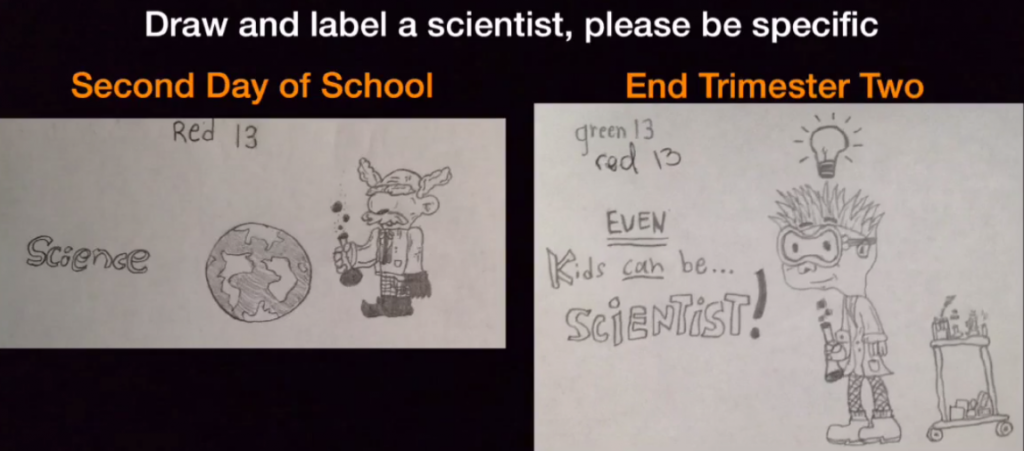
(One of my student’s work showing the student becoming empowered)
Last year I developed a flipped gamified classroom using the zombie apocalypse called “Project Z.” The students ate it up and displayed major growth in my Life Science class. However, that platform for student voice was still missing on a broad level. So in August of last year, I was on Twitter and it occurred to me: Twitter gave me the platform to allow a teacher from Finland to answer one of my pedagogical questions. This is the global platform I must model my classroom after.

(Sarenawati Jafaar’s [@sjaafar] school, Sekolah Rendah Islam AlHafeez (AlHafeez Islamic Elementary School), Pasir Mas, Malaysia)
GlobalCOlab has been a learning and collaborating experience just as much for its teachers as it has been for its students. To help facilitate and map this idea, GlobalCOlab co-creator, Dr. Trisha Callella (@shareTED), and I sat down and mapped out the important components to a successful collaboration that could transcend both distance and time zones.
The steps included: creating procedures to investigate problems using scientific/engineering processes, pitching their proposed procedures to global collaborators to assemble collaborative labs, simultaneously conducting real world research through inquiry and collaboration, collaboratively testing solutions by creating hands-on labs and investigations for global scientific learning, sharing out those results, and global peer review of each other’s work.
The students would be using the scientific and engineering processes on a global platform and scale. The question was: Could this be done? at the middle school level? To this, Dr. Callella suggested using VoiceThread as she had used in both her elementary classroom and graduate program.
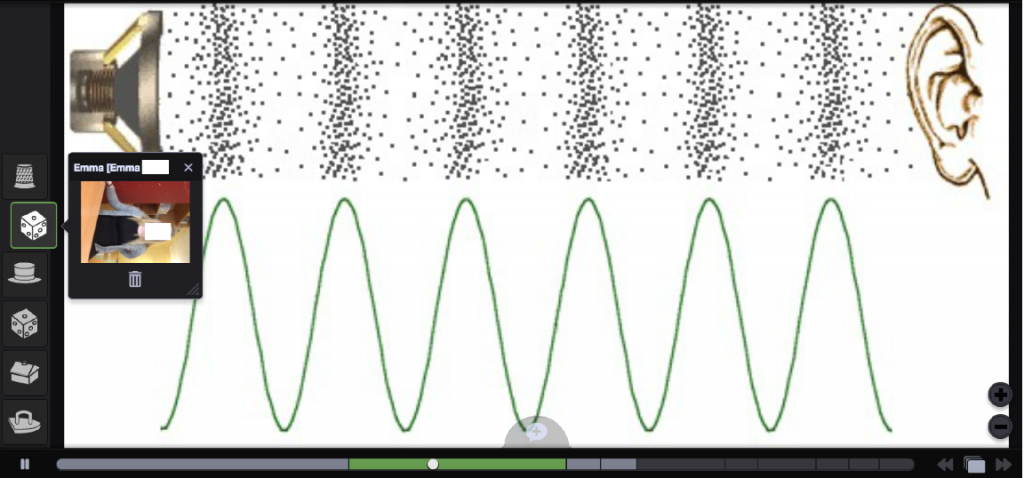
(Emma from Anders Enström’s, @aenstrom70, class in Sweden peer reviewing one of my student’s work about soundwaves.)
I eagerly rushed to sign up for Voice Thread. VoiceThread contacted me and supplied a school site license of 350 accounts. Those accounts are being used by students in Malaysia, Sweden, Ohio, and my classroom. VoiceThread provided the students around the world a workspace where distance and time zones were not a factor.
My students would post their work, and when they got to school they would see replies from students all over the world that were posted while they were asleep. In VoiceThread, the replies are framed around the student’s work and the student has the power to reorder the comments whichever way they prefer. This was the platform that empowered my classroom during the investigation process.
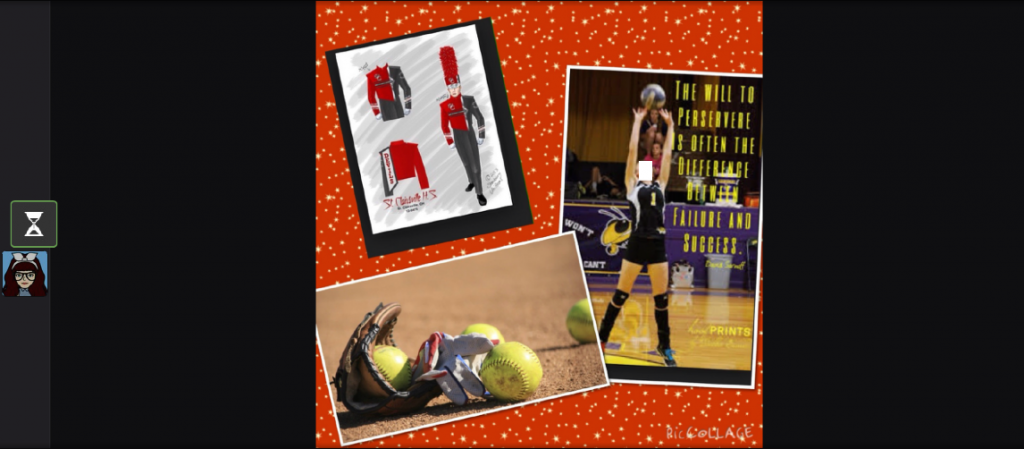
(A student from Liz Meredith’s, @meredithscience, science class in Saint Clairsville, Ohio uses the platform to express herself)
The results of GlobalCOlab have been amazing. GlobalCOlab did all it was designed to do and more. By using Voice Thread as one of the platforms for student choice, students were able to research, investigate, and present information for collaborative labs and then peer review each other’s work. In doing so, my students were able to not only embed the scientific and engineering processes into their work and community, but become excited about it as they knew there was an authentic global audience.
They could share their ideas, learn, and receive feedback from global peers. It is this type of connected learning that allows teachers to grow everyday through Twitter and planned learning networks. GlobalCOlab expanded this in middle school classrooms around the world. Thanks to VoiceThread, students voices were heard around the world.
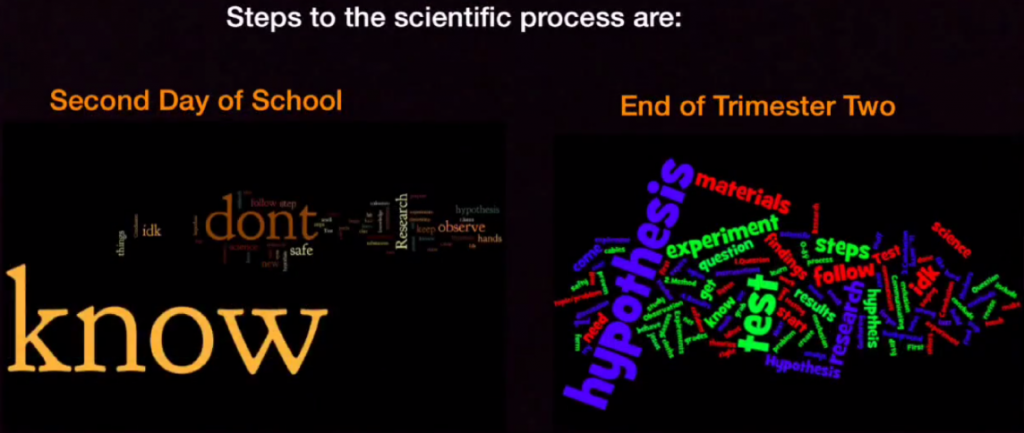
(An anonymous survey asked to my students, and the results second day of school compared to 24 weeks into GlobalCOlab)
About the Author: Brian Jones, @ProgresivTeachr, is the co-creator of GlobalCOlab. Brian currently teaches 7th Grade Life Science at Los Alisos Middle School in Norwalk, CA where he and his students are having fun learning and growing along with the 400 students currently in GlobalCOlab worldwide.
This is a guest post by educator and VoiceThreader Pam Sengos.
Personalizing Learning for All Students
As a technology coach in my district, I have the opportunity to work with many wonderful teachers and students. In the past few years, our district has researched and invested time in personalized learning for all students based on their own skills, interests, and learning paths.
With a team of third grade teachers, we began our work by redesigning our Culture Unit. Our mission was to give students more ownership over their learning by allowing more choice in how they learned and what they learned, customize a learning pathway which allowed students to take steps in achieving their goals and demonstrate mastery of content, and lastly give students an authentic audience in which they could share their learning and knowledge with others.
Using Voicethread to Connect with Our Community and Global Partners
To fully embrace and understand different cultures, we knew we needed to give students the opportunity to reach out globally. Through Harvard’s Out of Eden Learn platform, we connected with several different classrooms from around the world. Out of Eden Learn not only follows the expedition of journalist, Paul Salopek, as he walks seven years around the world, but also gives students a platform in which they can converse with others safely and specifically around activities called “Footsteps.” In Footstep #2, students were asked to draw a map that represented a local area or their own neighborhood.
We uploaded students’ beautifully designed maps and then asked them to share focal points of their neighborhood or special stories that happened within them. By using the drawing tool in Voicethread, it allowed students to help their global partners focus on the parts of their map in which they were talking about in their story. It really allowed their audience to have a deeper understanding of where we live and stories that connect us to our daily lives and communities. In addition, we allowed comments to be posted by others in our voicethread to give others the opportunity to ask questions or comment on our maps and stories.
Using Voicethread as a Reflection Tool
Voicethread has been a powerful tool that has allowed students to reflect on their learning experience. Reflection is important for all students as they look back at their learning and see ways they were successful and areas in which they want to improve on. It allowed teachers a way to assess how students felt about the process and how learning was made personal and meaningful to their students. Voicethread gave teachers a direction on how to move forward with personalizing other areas of their curriculum and classroom by listening to student feedback.
About the author:
Pam Sengos is an Information Technology Literacy Teacher for the Oregon School District in Wisconsin. She serves on the district’s technology and personalized learning committees. Pam collaborates with teachers and provides professional development as well as works with students to help make learning meaningful and engaging. Her twitter handle is @psengos Also, you can follow her on their District’s Technology Facebook page.
How can schools ensure that science fair projects are fair? A recent article by The Atlantic details some of the ways science fair projects have been corrupted by over-involvement from parents and we would like to offer a solution to this growing problem.
This problem exists mainly because teachers can’t observe and assess the student’s work at home. Most science fairs are essentially take-home projects, so parents who mean well may be taking over much of the design and creation process from their children. While these parents are trying to help, they often undercut the initiative and learning experiences of their children. Science fairs aren’t intended to be assessments of a parent’s understanding of the scientific process, but often that is exactly what they are.
So how can educators redesign science fairs to recapture the original intent? Our suggestion would be to ask students to document their process with VoiceThread. If students and teachers interact asynchronously via VoiceThread during the planning process, parental involvement will be limited to buying materials and supporting the learning instead of hijacking it.
Here is one example of how this might look:
The process can be made even more transparent with the use of video if the student “shows their work” by recording the construction of the experiment as well as their thinking. Because VoiceThreads are living, evolving content, students can upload work, get feedback from their teacher, then revise and upload new iterations all in the same place. In essence, students can use VoiceThreads as a transparent, digital portfolio tool. We think this can help restore science fairs to their original status as amazing ways to create hands-on learning experiences that genuinely impact student understanding of the scientific method. What do you think?

